Health Score
One number from 0 to 100 for the state of a report, with the reasoning attached. Every score comes back with a five-row breakdown saying what each category found, what it was measured against, and how many points it kept.
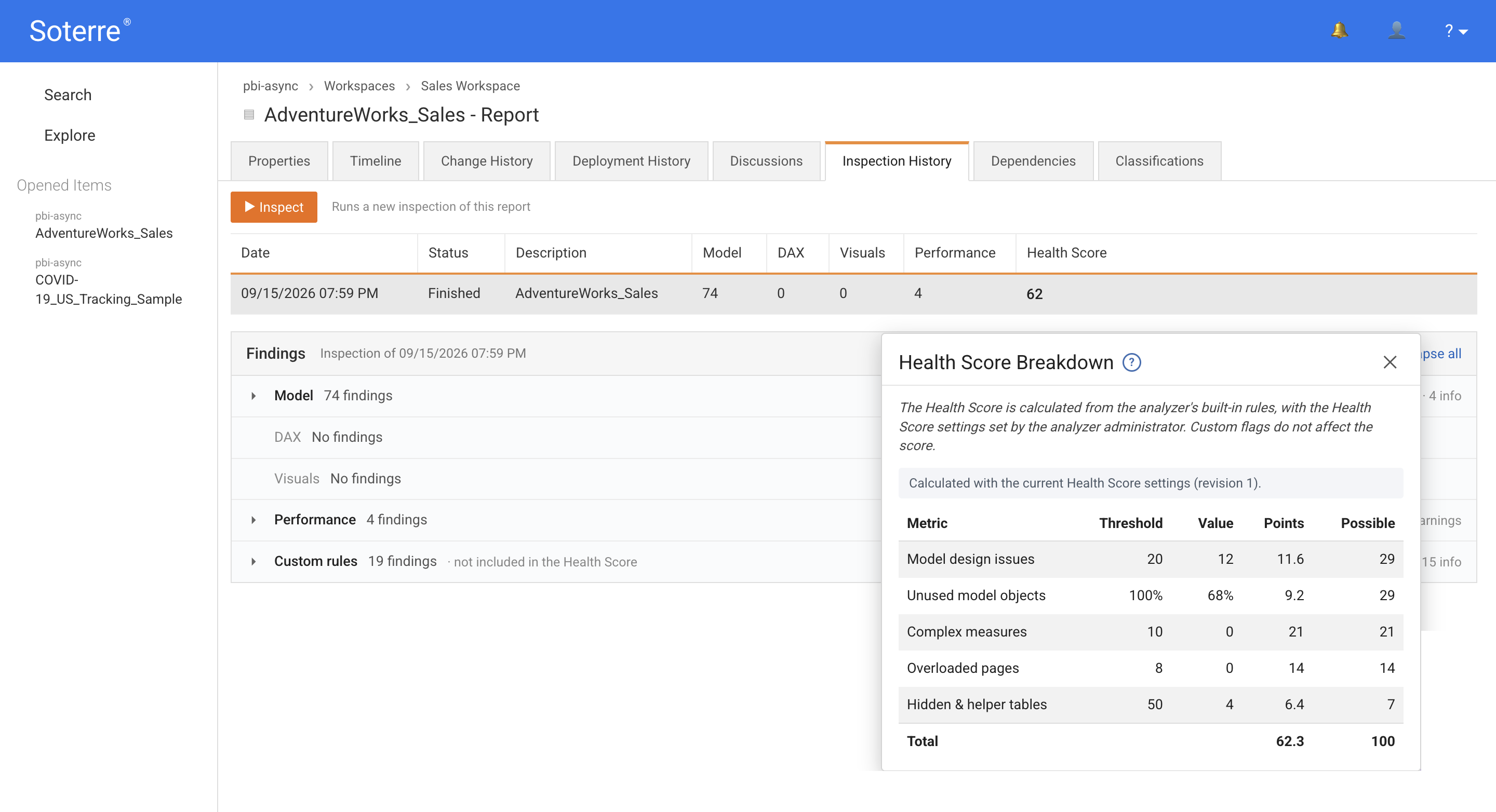
The five categories
| Category | Label in Soterre | Counts | Measured against | Worth |
|---|---|---|---|---|
| Structural | Model design issues | Duplicated tables, columns and measures; auto date/time tables; complex calculated columns | 20 findings | 29 points |
| Unused | Unused model objects | Share of the model nothing references | 100 % | 29 points |
| Complex DAX | Complex measures | Measures scoring above the complexity floor | 10 findings | 21 points |
| Pages | Overloaded pages | Pages with a heavy visual load or card clusters | 8 pages | 14 points |
| Minor | Hidden & helper tables | Auto-hidden tables and tables referenced only by DAX | 50 findings | 7 points |
The five add up to exactly 100.
Worked example
A report with 5 duplicate objects, 40 % of its model unused, 3 complex measures, 2 overloaded pages and 12 hidden tables:
| Category | Findings | Threshold | Points kept |
|---|---|---|---|
| Structural | 5 | 20 | (20−5)/20 × 29 = 21.75 |
| Unused | 40 % | 100 % | (100−40)/100 × 29 = 17.40 |
| Complex DAX | 3 | 10 | (10−3)/10 × 21 = 14.70 |
| Pages | 2 | 8 | (8−2)/8 × 14 = 10.50 |
| Minor | 12 | 50 | (50−12)/50 × 7 = 5.32 |
| Score 70 |
Editing Health Score
Weights and thresholds are editable in the Admin Console on the Health Score page. The table shows each category's threshold, weight and resulting points, updating as you type.
The Total must come to exactly 100. Because points are rounded, some weight combinations give 99 or 101; the total then turns red and Save is unavailable until you adjust a weight.
Saving increases the settings revision by one.
Existing scores are never recalculated
New settings apply only to analyses run after saving, and every score keeps the methodology version and settings revision it was calculated under.
Reading a score that changed
Before concluding a report got worse, check the methodology version and settings revision stored with the score. A retune changes every score computed after it, and scores computed under different settings are not comparable — which is exactly why each one carries its own provenance.